
The way I create videos has completely changed over the last year. Earlier, making even a simple video meant recording, editing, retakes, and spending hours just to get one decent output. Now, AI tools are doing most of that work in minutes.
That’s exactly why I decided to try Zoice. I kept seeing it mentioned when searching for the best AI avatar generator, so I wanted to see if it actually lives up to the hype or if it’s just another tool. After using it for different types of content like short videos, ads, and basic scripts, I can say this review is based on real usage, not just features on a page.
Table of Contents
What Zoice Actually Is (From My Experience)
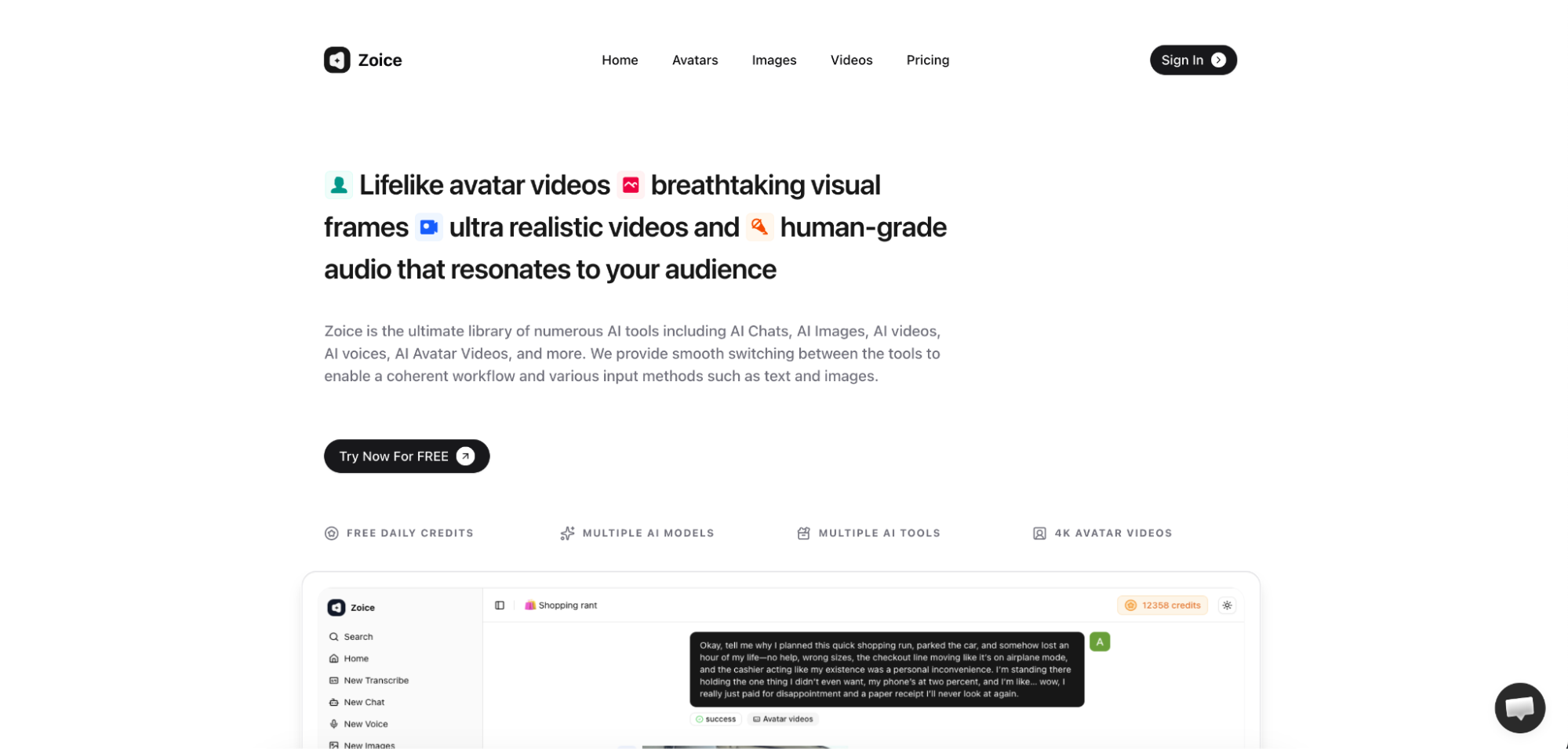
When I first opened Zoice, it didn’t feel like a complicated software. It felt more like a complete system where everything is already connected. You don’t have to jump between tools for script, voice, and video.
Zoice is basically an all-in-one AI platform where you can create avatar videos, generate voiceovers, and build content without recording anything yourself. I tested it by creating a simple script, and within minutes, I had a finished video ready.
What I liked immediately was how it removes the usual barriers. You don’t need a camera, editing skills, or even experience to get started.

Where Zoice Fits Best (Based on Real Use)
After trying it for a few different use cases, I realized Zoice is not just for one type of user. It works well in multiple situations depending on what you want to create.
I personally tested it for short-form content and basic YouTube-style videos, and it worked smoothly. It’s also clear that it’s designed for people who want to scale content, not just create one or two videos.
It fits best for:
- Faceless YouTube channels
- Social media content
- Ad creatives (especially UGC style)
- Educational or explainer videos
Why I Think Zoice Is Growing So Fast
After using it, the growth actually makes sense. It’s not just hype. It solves real problems that creators face every day.
For example, a lot of people don’t want to be on camera anymore. I also prefer faceless content sometimes, and Zoice makes that very easy with avatars that feel natural.
Another big reason is speed. Instead of spending hours editing, I was able to generate videos in minutes. That alone makes a huge difference if you are creating content regularly.
Features I Personally Tested in Zoice
AI Avatar Creation:
- The first thing I tried was avatar selection, and honestly, this is where Zoice impressed me the most. The avatars don’t feel robotic like many other tools I’ve seen.
- They have expressions, different styles, and they actually look engaging. I tested both a professional-style avatar and a casual one, and both worked well depending on the content type.
Character Swap & Motion Control:
- This feature felt very powerful once I started experimenting with it. I created one video and then changed the avatar without rebuilding everything.
- For someone creating multiple versions of content, this is a big time saver. I could easily test different styles without starting from scratch every time.
Lip Sync Quality (Very Important):
- I paid extra attention to lip sync because this is where most AI tools fail. Surprisingly, Zoice handled this really well.
- The voice and mouth movement matched naturally, and it didn’t feel off while watching. This small detail actually makes a big difference in how real the video looks.
AI Chat, Script & Image Features:
- I also tried generating scripts using the built-in AI, and it worked well for basic content ideas. It’s not perfect, but it gives a good starting point.
- Being able to go from script to video in one place saves a lot of effort. I didn’t need any extra tools, which made the workflow smoother.
Voice Generation:
- The voice quality was better than I expected. It sounded clear and human-like, not robotic or flat.
- I tested different tones, and it was easy to match the voice with the avatar. This helped make the final video feel more natural.
Templates & Automation:
- For beginners, this is probably one of the best parts. I used a template for my first video, and it made everything easier.
- Instead of figuring out structure, I just replaced the content. It saved time and helped me focus more on the message instead of editing.
AI Agents (Underrated Feature):
- This is something I didn’t expect to use much, but it turned out to be useful. The AI agents help with ideas and workflow.
- It feels like having a small assistant inside the platform. Not many tools offer this level of support.
Output Quality After Testing
I tested videos in different resolutions, including 720p and 1080p, and the quality was consistent. Everything looked clean and usable.
4K rendering is available, but it takes slightly more time. That said, the output quality is sharp and feels professional.
What I liked most is that the avatar quality doesn’t drop across resolutions. It stays consistent.
Pricing: Is It Worth It?
After comparing it with other tools, I feel Zoice is priced reasonably for what it offers.
Instead of paying for multiple tools, everything is included in one platform. That itself saves money in the long run.
For creators who want to scale content, the pricing feels justified.
Pros and Cons (From My Usage)
Pros:
- Zoice is easy to use and doesn’t require technical skills. The avatars look realistic, and the lip-sync works well.
- It also saves a lot of time because everything is in one place. For content creators, this is a big advantage.
Cons:
- The only thing I noticed is that 4K rendering takes a bit longer time. It’s not a major issue, but something to keep in mind.
Zoice vs Other AI Avatar Tools
After using Zoice, I compared it with some well-known tools.
- Synthesia feels more corporate but is more expensive
- HeyGen is good but locks features behind higher plans
- D-ID is basic compared to Zoice
- Colossyan is more focused on training videos
Zoice feels more flexible and balanced overall.
Who Should Use Zoice?
From my experience, Zoice is a good fit for anyone who wants to create videos regularly without spending too much time.
If you are a content creator, marketer, or even running an agency, this tool can help you scale faster.
It is especially useful if you want to create faceless content or test multiple video variations.
My Final Thoughts After Using Zoice
After testing Zoice properly, I can say it doesn’t feel like just another AI tool. It feels like a complete content creation system.
The biggest advantage is speed combined with quality. You can go from idea to video in minutes, and the output still looks professional.
If someone asks me for the best AI avatar generator right now, Zoice would definitely be one of my top recommendations.
FAQs
- Is Zoice free?
Yes, there is a free plan available, but it has limited features for testing. - Is Zoice good for beginners?
Yes, the interface is simple, and templates make it easy to start. - Can I use Zoice for YouTube videos?
Yes, it works very well for faceless YouTube content. - Does Zoice support 4K videos?
Yes, it supports 4K, but rendering takes slightly more time. - Is Zoice better than other tools?
From my experience, it offers a better balance of features, price, and ease of use.
For the reason that the admin of this site is working, no uncertainty very quickly it will be renowned, due to its quality contents.
I am truly thankful to the owner of this web site who has shared this fantastic piece of writing at at this place.
Great information shared.. really enjoyed reading this post thank you author for sharing this post .. appreciated
I like the efforts you have put in this, regards for all the great content.
This was beautiful Admin. Thank you for your reflections.
I very delighted to find this internet site on bing, just what I was searching for as well saved to fav
naturally like your web site however you need to take a look at the spelling on several of your posts. A number of them are rife with spelling problems and I find it very bothersome to tell the truth on the other hand I will surely come again again.
Nice post. I learn something totally new and challenging on websites
Really great explanation.
Very practical tips.
Awesome! Its genuinely remarkable post, I have got much clear idea regarding from this post
very informative articles or reviews at this time.
I am truly thankful to the owner of this web site who has shared this fantastic piece of writing at at this place.
This is my first time pay a quick visit at here and i am really happy to read everthing at one place
I appreciate you sharing this blog post. Thanks Again. Cool.
Great information shared.. really enjoyed reading this post thank you author for sharing this post .. appreciated
This is really interesting, You’re a very skilled blogger. I’ve joined your feed and look forward to seeking more of your magnificent post. Also, I’ve shared your site in my social networks!
I’m often to blogging and i really appreciate your content. The article has actually peaks my interest. I’m going to bookmark your web site and maintain checking for brand spanking new information.
I truly appreciate your technique of writing a blog. I added it to my bookmark site list and will
very informative articles or reviews at this time.
I very delighted to find this internet site on bing, just what I was searching for as well saved to fav
This is really interesting, You’re a very skilled blogger. I’ve joined your feed and look forward to seeking more of your magnificent post. Also, I’ve shared your site in my social networks!
I truly appreciate your technique of writing a blog. I added it to my bookmark site list and will
This will definitely help in selecting the right materials.
This is really interesting, You’re a very skilled blogger. I’ve joined your feed and look forward to seeking more of your magnificent post. Also, I’ve shared your site in my social networks!
Very approachable writing style.
This was beautiful Admin. Thank you for your reflections.
I’m often to blogging and i really appreciate your content. The article has actually peaks my interest. I’m going to bookmark your web site and maintain checking for brand spanking new information.
Thanks for the tips—trying them out today.
Amazing breakdown — the numbered steps made it easy to follow.
I very delighted to find this internet site on bing, just what I was searching for as well saved to fav
This is really interesting, You’re a very skilled blogger. I’ve joined your feed and look forward to seeking more of your magnificent post. Also, I’ve shared your site in my social networks!
I just like the helpful information you provide in your articles
Phim Sex – Xem Phim Sex Nóng Chọn Lọc Mới Nhất – Vlxvn.Blog
I appreciated the formatting — easy to skim and still informative.
sitenizi takip ediyorum makaleler Faydalı bilgiler için teşekkürler
I’m often to blogging and i really appreciate your content. The article has actually peaks my interest. I’m going to bookmark your web site and maintain checking for brand spanking new information.
Makaleniz açıklayıcı yararlı anlaşılır olmuş ellerinize sağlık
Verdiginiz bilgiler için teşekkürler , güzel yazı olmuş
Daha önce araştırıp pek Türkçe kaynak bulamadığım sorundu Elinize sağlık eminim arayan çok kişi vardır.
Pretty! This has been a really wonderful post. Many thanks for providing these details.
very informative articles or reviews at this time.
This is really useful.
Good post! We will be linking to this particularly great post on our site. Keep up the great writing
Daha önce araştırıp pek Türkçe kaynak bulamadığım sorundu Elinize sağlık eminim arayan çok kişi vardır.
Nice post. I learn something totally new and challenging on websites
Xem phim sex clip sex Việt Nam không che mới nhất được GaiDamVL tuyển chọn, cập nhật liên tục mỗi ngày.
I like your writing style—clear and friendly.
Yazınız için teşekkürler. Bu bilgiler ışığında nice insanlar bilgilenmiş olacaktır.
Pretty! This has been a really wonderful post. Many thanks for providing these details.
I’m often to blogging and i really appreciate your content. The article has actually peaks my interest. I’m going to bookmark your web site and maintain checking for brand spanking new information.
Bu konu hakkında bilgi vermeniz çok güzel. Genellikle türkçe içerikler az oluyor fakat böyle güzel içerikler görmek ve okumak çok zevkli.
Nice post. I learn something totally new and challenging on websites
Aradığım canlı yayın deneyimini burada buldum.
I’m often to blogging and i really appreciate your content. The article has actually peaks my interest. I’m going to bookmark your web site and maintain checking for brand spanking new information.
I just like the helpful information you provide in your articles
I very delighted to find this internet site on bing, just what I was searching for as well saved to fav
I just like the helpful information you provide in your articles
I very delighted to find this internet site on bing, just what I was searching for as well saved to fav
Super duplex steel’s high strength makes it ideal for offshore structures.
I’m often to blogging and i really appreciate your content. The article has actually peaks my interest. I’m going to bookmark your web site and maintain checking for brand spanking new information.
I like the efforts you have put in this, regards for all the great content.
Stainless steel suppliers serving Europe and the Middle East must meet strict standards.
International steel trade requires strong documentation and certification support.
Very informative and easy to follow. Looking forward to more like this.
Nice post. I learn something totally new and challenging on websites
Xem phim sex clip sex Việt Nam không che mới nhất được GaiDamVL tuyển chọn, cập nhật liên tục mỗi ngày.
Phim Sex – Xem Phim Sex Nóng Chọn Lọc Mới Nhất – Vlxvn.Blog
Xem phim sex clip sex Việt Nam không che mới nhất được GaiDamVL tuyển chọn, cập nhật liên tục mỗi ngày.
Hi there to all, for the reason that I am genuinely keen of reading this website’s post to be updated on a regular basis. It carries pleasant stuff.
For the reason that the admin of this site is working, no uncertainty very quickly it will be renowned, due to its quality contents.
Sitenizin tasarımı da içerikleriniz de harika, özellikle içerikleri adım adım görsellerle desteklemeniz çok başarılı emeğinize sağlık.